Download HD videos and MP3 music from YouTube, TikTok, Instagram, Facebook, and thousands of other supported websites. VidMate is your all-in-one free video downloader and music downloader, offering fast downloads, multiple formats, high-quality output, and a safe, seamless experience on Android.
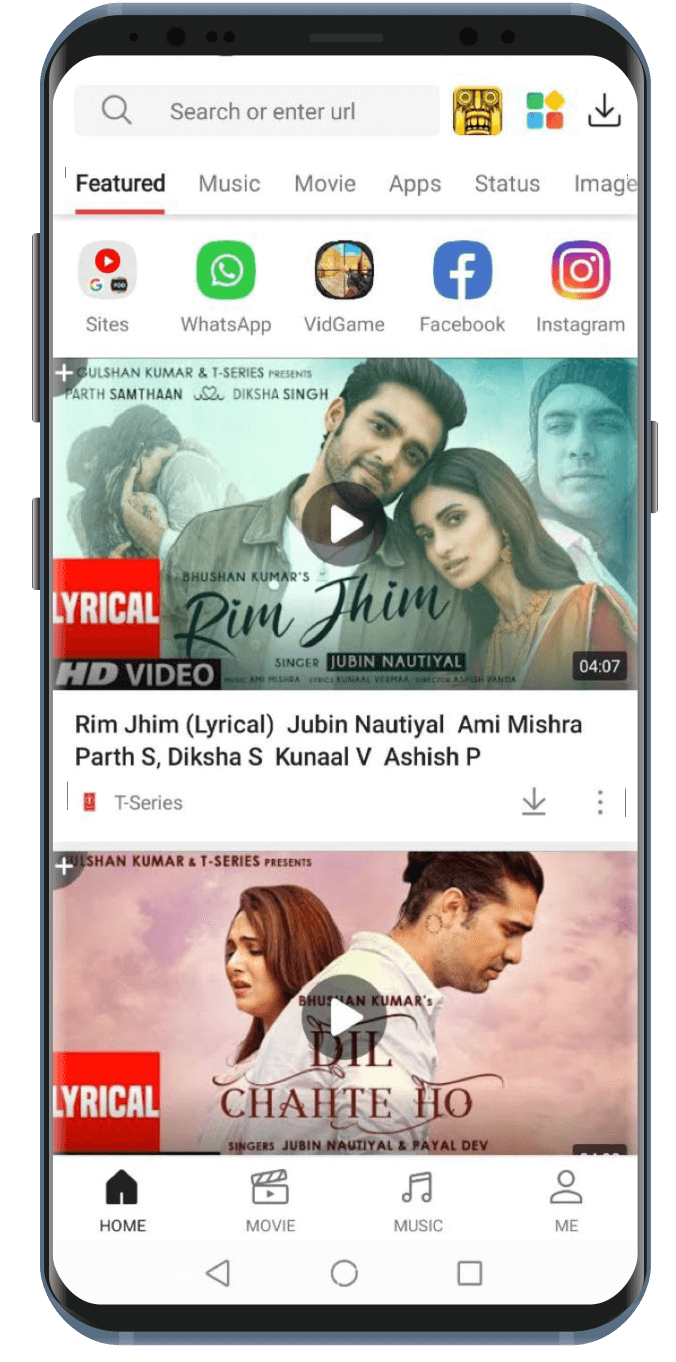
VidMate is a free video and music downloader app made for Android phones. It allows you to save videos, songs, and pictures from over 1,000 websites. You can grab content from YouTube, TikTok, Instagram, Facebook, and many more without switching between different apps.
Think of VidMate as your all-in-one tool for saving the things you love online, whether it is a funny video, a great song, or a cool movie clip.
Our app is 100% free. There are no monthly fees, no hidden charges, and no need to sign up. You just install it, open it, and start downloading.
| Detail | Info |
|---|---|
| App Name | VidMate - Your Free Video & Music Downloader |
| Latest Version | v6.0102 (Updated 2026) |
| File Size | 32.4 MB |
| Android Required | Android 5.0 or newer |
| Price | 100% Free |
| Total Users | 200 Million+ Worldwide |
| Security | Verified by CM Security, Lookout & McAfee |
| Category | Video & Music Downloader |
| Available On | Android (APK), Desktop via Emulator |
| Contact | [email protected] |
Millions of people use VidMate every day. Why? Because it is simple, fast, and it actually works. Here are the real reasons VidMate stands out from other downloader apps.
Some apps say "free" but then charge you for HD quality, faster speeds, or more downloads. Our VidMate gives you everything for free. HD downloads, MP3 conversion, batch downloads all of it. No credit card needed. No sneaky subscriptions waiting to charge you.
Most downloader apps only work on one or two platforms. VidMate works on over 1,000. That means you can download from YouTube, Instagram, TikTok, Facebook, Vimeo, Dailymotion, Twitter, Pinterest, and hundreds of other sites using just one app.
VidMate uses smart multi-thread download technology. This means it breaks a video into smaller pieces and downloads them all simultaneously. The result? Downloads that are up to 5 times faster than normal apps. Even large, high-quality videos save quickly.
See the full, honest breakdown of why people choose VidMate →
Pick your quality per download, from 144p to save storage, all the way up to 2K/4K/8K for the sharpest picture on large screens. Most free apps cap out at 1080p.
Convert any video into MP3, AAC, M4A, WAV, or FLAC with one tap, up to 256kbps quality, without needing a separate music app.
Download an entire YouTube playlist, queue up multiple videos, or save a full album in one action instead of downloading files one at a time.
Save a photo or video status before it disappears after 24 hours. Works for Instagram Stories too.
See the complete feature list, formats, and what's new in 2026 →
VidMate connects to a huge number of websites. Here are some of the most popular ones you can use it with right now:
| Platform | What You Can Download |
|---|---|
| YouTube | Videos, music videos, short clips, full playlists |
| TikTok | Videos without watermarks |
| Reels, stories, photos, IGTV videos | |
| Public videos, reels, stories | |
| Twitter / X | Video tweets and clips |
| Photos and video pins | |
| Vimeo | HD professional videos |
| Dailymotion | Full-length videos and clips |
| Status videos and photos | |
| Tumblr | Video and image posts |
| Metacafe | Short video clips |
| Voot | Indian TV shows and movies |
| Ozee | Streaming content |
| And 1,000+ more | From entertainment, news, sports, and education sites |
VidMate is not on the Google Play Store because of Google's download policies. But do not worry. Installing it is easy and safe. Just follow these steps:
Since VidMate comes as an APK file (not from the Play Store), you need to allow your phone to install it. Here is how: Open your phone's Settings app > Go to Security or Privacy > Find the option called "Install Unknown Apps" or "Unknown Sources" > Turn it ON. This is a one-time step.
Go to the official VidMate website on your phone's browser. Find and tap the Download button. The APK file will download to your phone. It only takes a few seconds.
Open your Downloads folder. Tap on the VidMate APK file. A prompt will ask if you want to install it. Tap Install and wait about 30 seconds. Now VidMate is on your phone.
After installing VidMate, go back to your Settings and turn off "Unknown Sources" or "Install Unknown Apps." This protects your phone from accidentally installing other unsafe apps.
Open VidMate. Browse the app or use the built-in search to find a video or song. Tap the Download button, choose your quality and format, and your file will be saved in seconds.
• Open VidMate on your Android phone
• Tap the search bar at the top and type the name of the video you want
• Or paste a link from YouTube, TikTok, Instagram, etc.
• Pick the video from the results
• Tap the Download button (it looks like an arrow pointing down)
• Choose your format: MP4 for video, MP3 for audio only
• Pick your quality: 360p, 720p, 1080p, 4K, etc.
• Tap Download, and your file is saved in seconds
• Search for or open a YouTube playlist inside VidMate
• Tap the Download All or Batch Download option
• Choose the quality you want for all files
• VidMate downloads every video in the playlist automatically
• Open VidMate and tap the Status section from the home screen
• VidMate will show all the recent statuses from your WhatsApp contacts
• Tap the Save button next to any status video or photo
• The file is saved to your phone gallery immediately
• Find any video in VidMate
• Tap Download and choose MP3 as the format instead of MP4
• VidMate will extract just the audio and save it as a high-quality MP3 file
How does VidMate compare to other popular downloader apps? Here is an honest look:
| Feature | VidMate | SnapTube | Y2Mate | SaveFrom |
|---|---|---|---|---|
| Supported Sites | 1,000+ | ~200 | YouTube Only | ~50 |
| Max Video Quality | 8K | 4K | 1080p | 1080p |
| MP3 Audio Download | Yes | Yes | Yes | Limited |
| Batch / Playlist Download | Yes | No | No | No |
| WhatsApp Status Saver | Yes | Yes | No | No |
| Live TV (200+ Channels) | Yes | No | No | No |
| Built-In Media Player | Yes | Yes | No | No |
| Background Audio Play | Yes | Yes | No | No |
| No Login Required | Yes | Yes | Yes | Yes |
| Completely Free | Yes | Yes (Ads) | Yes (Ads) | Yes (Ads) |
| Works Without Internet | Yes | Yes | No | No |
VidMate allows you to choose where to save your files. If your phone has a memory card (SD card), you can set VidMate to save all downloads there instead of your phone's internal storage. This way, you never run out of space.
High-quality videos use a lot of data. If you are not on Wi-Fi, choose 360p or 480p. These still look great on a phone screen and use much less data. You can always re-download in HD when you are back on Wi-Fi.
VidMate has a downloads section where you can see all your saved files. You can rename files, delete ones you do not need, and organize everything into folders. This keeps your download library clean and easy to search.
If you are downloading a movie or a big playlist and your battery is low, just pause the download. VidMate saves exactly where you stopped. Resume it later when you are charging your phone, and it picks up right where it left off.
This is one of the most common questions people ask. The short answer is: yes, VidMate is safe.
Every version of VidMate is scanned for viruses and harmful software before it is released. Three major security tools check every update:
• CM Security: scans for malware and spyware
• Lookout: checks for privacy risks
• McAfee: verifies the app is clean of viruses
If VidMate passes all three checks, you can trust it is clean.
VidMate does not ask for your name, email, phone number, or any social media login. It does not track what you search or what you download. Your activity stays private on your own device.
Google's Play Store has strict rules about apps that let you download content from other platforms. VidMate does not meet those rules, not because it is dangerous, but because Google does not allow download apps like this. The app itself is perfectly safe.
There are fake websites that use the VidMate name and logo but offer different APK files that may contain viruses. Always download VidMate from the official website. Check the URL carefully. The real VidMate team can be reached at [email protected].
One of the best things about downloading videos instead of streaming them is that you can enjoy them anywhere, even without internet.
Watch Movies on a Plane or Train: Download your favorite movies or TV episodes before you leave. You can watch them on your flight or bus ride without needing Wi-Fi.
Listen to Music Without a Streaming App: Convert your favorite songs to MP3 and build your own music library. Play them anytime using VidMate's built-in player.
Study and Learn Offline: Download tutorial videos or school lectures and watch them later at your own pace.
VidMate is made for Android, but you can use it on a Windows or Mac computer:
1. Download an Android Emulator: The most popular and trusted one is BlueStacks.
2. Open the Emulator: Launch BlueStacks on your computer.
3. Install VidMate Inside the Emulator: Download the VidMate APK file on your computer and drag it into the BlueStacks window.
4. Start Downloading on Your PC: Open VidMate inside BlueStacks and use it just like you would on a phone.
If a download is not starting or keeps failing, try these fixes:
• Check your internet connection: switch between Wi-Fi and mobile data
• Make sure you have enough storage space on your phone
• Update VidMate to the latest version
• Clear the app cache: go to Settings > Apps > VidMate > Clear Cache
• Restart your phone and try again
Slow downloads are usually caused by a weak internet signal:
• Move closer to your Wi-Fi router
• Choose a lower video quality (like 720p instead of 4K)
• Pause other downloads running at the same time
• Download during off-peak hours
If you get an error when installing:
• Make sure "Unknown Sources" is turned on in your Settings
• Check that the APK file finished downloading completely
• Make sure your phone runs Android 5.0 or newer
• Delete the old APK file and re-download from the official website
If a downloaded video has no audio:
• Try downloading the video again in a different format (e.g., MP4 instead of FLV)
• Make sure your phone is not on silent mode
• Try playing the file in a different video player app
If VidMate crashes often:
• Update to the latest version of VidMate
• Clear the app cache and data
• Uninstall and reinstall the app
• Check if your phone has enough RAM (needs at least 2 GB)
Yes. VidMate is completely free. There are no subscription fees, no in-app purchases, and no paid tiers. Every feature, including HD downloads, MP3 conversion, batch downloads, and Live TV, is available to everyone at no cost.
Google does not allow apps that let users download videos from platforms like YouTube. It is a policy issue, not a safety issue. VidMate is safe and used by over 200 million people worldwide. You can download it safely from the official VidMate website.
Download the APK from the official website. Enable "Unknown Sources" in your Settings. Tap the APK file and choose Install. The whole process takes less than two minutes.
No. VidMate is currently only available for Android phones. Apple's iOS system does not allow this type of app. If you have an iPhone, you would need to look for iOS-specific alternatives.
See the full FAQ, including safety, formats, and troubleshooting →
VidMate keeps getting better. The 2026 update brings several improvements that make downloading even smoother:
The core download system has been upgraded. Downloads are now up to 5 times faster than before, even for large 4K files. The app now splits large files into more parts and downloads them in parallel, which means less waiting for you.
VidMate 2026 now supports even more websites, including newer platforms like Snapchat, Reddit video, and several regional Indian streaming apps. The team keeps adding new sites with every update.
VidMate now automatically finds the best available quality for each video and puts it at the top of the list. You still get to choose what you download, but the best option is always easy to find.
The home screen has been refreshed to feel cleaner and faster. Icons are larger and easier to tap. The download progress screen now shows estimated time remaining for each file.
The built-in file manager now lets you create folders, rename files, and sort your downloads by date, size, or format. Keeping your media library organized is much easier.
VidMate now uses AI to study your viewing habits and suggest content you will probably enjoy. The more you use the app, the smarter these recommendations get.
Download Started
VidMate APK installation file is downloading.